
Table of Contents
Composer to install, Drush to manage configuration, Git to track
Drush is still alive and kicking in Drupal 8 but the areas of installing Drupal core and contributed modules have been taken over by Composer, the PHP dependency manager. It takes a bit more effort to set up your environment and learn the new Composer ways of Drupal 8, but if Drupal is an important part of your work this is the way to go.
Update #Drupal8 core through CLI with ComposerTweet this
Besides installing the Drupal “engine” (the regular “Drupal installation folder”) you're used to in Drupal 7, Composer also creates some other folders where the dependency management magic happens, along with some other useful Drupal management features and its own Drush.
This means that the project folder structure is a bit different from Drupal 7. The folder where Composer installs the project is where the important dependency configuration files that need to be tracked with Git are located (composer.json and composer.lock) and that is where you need to call the composer command from.
The “Drupal folder” where you have to call Drush from is the web/ folder inside the project folder. In a common workflow, you'll switch between those two locations depending on whether you're installing a new module (with composer) or enabling it (with Drush).
cd /var/www/html/myd8project/
composer [options]
cd web/
../vendor/bin/drush version
Or if you have Drush Launcher installed the drush command will be aware of which project folder it's being called from and it will use the relevant project-related Drush installation:
cd web/
drush version
Composer and PHP7 strongly recommended
Although Drupal 8 doesn't require PHP 7 you'll likely experience problems with Composer installs if you rely on older PHP versions. If you need help updating your PHP I've already written about my experience: Install Drupal 8 on Ubuntu 14.04 LTS.
There's more to it than simply installing the new PHP package, there are other packages that need to be installed or updated to be able to run Drupal 8 through Composer, and the Apache server modules need to be adjusted to the new version.
Common practise is to install Composer globally.
Back to topSpeed Composer up with Prestissimo
Composer is a PHP dependency manager, which is a layer (or more) of abstraction above Drush. Those used to Drush won't be happy to find that Composer installations take a lot more time compared to Drush. The time and effort of using Composer do pay off overall through savings in other areas (in projects that aren't trivial at least).
But there is a way to speed up Composer installs by enabling individual packages to download in parallel: Use Prestissimo
composer global require hirak/prestissimo
If you're using XDebug make sure it's disabled in CLI as it significantly slows down Composer (Speeding up Composer-based Drupal installation).
Back to topCreate the database and local virtual host
These commands relate specifically to Ubuntu with Apache server, your own environment and commands to use might differ slightly:
mysql -u root -p
[password]
create database myd8database;
exit
sudo cp /etc/apache2/sites-available/000-default.conf /etc/apache2/sites-available/myd8site.conf
The virtual host must point to the web/ folder inside the folder where you installed Drupal 8 with Composer because that is where the Drupal “engine” is.
<VirtualHost *:80>
ServerAdmin webmaster@localhostServerName myd8site.localServerAlias www.myd8site.local
DocumentRoot /var/www/html/myd8project/web/
<Directory /var/www/html/myd8project/web>
AllowOverride All
</Directory>
ErrorLog ${APACHE_LOG_DIR}/error-myD8site.log
CustomLog ${APACHE_LOG_DIR}/access-myD8site.log combined
</VirtualHost>
sudo a2ensite myd8site.confsudo service apache2 restartsudo nano /etc/hosts
# Add the line and save the file127.0.0.1 myd8site.local
Install Drupal 8 through Composer
Composer can install a standard Drupal instance into a folder you have set up to use for your site, using an empty database you created for this particular site. Using some special characters in your database password can be problematic, preventing the installation from going through, so keep that in mind if something goes wrong and you can't figure out why (in my experience those were & and #).
For all the steps please refer to the article: Install Drupal 8 on Ubuntu 14.04 LTS
Back to topUpdate Drupal 8 core through Composer
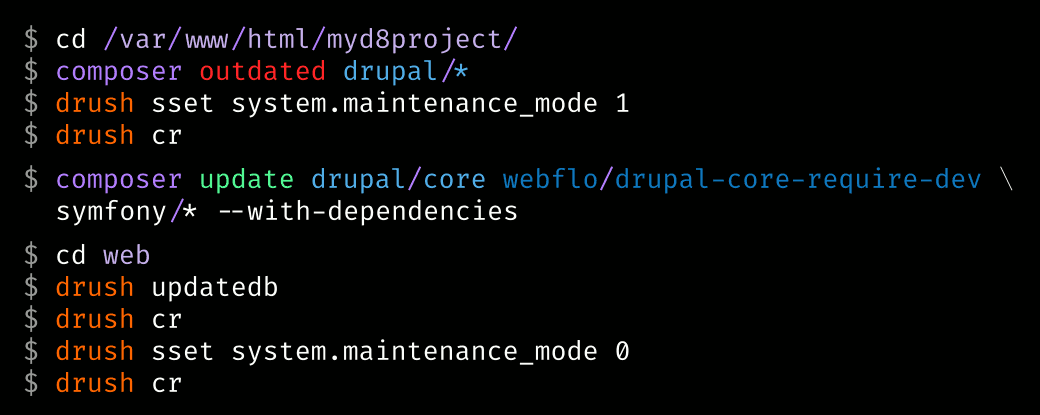
To check whether Drupal core, contributed modules, or other dependencies might be outdated run:
composer outdated drupal/*
As always, the first thing to do is make backups of the database and the project files (excluding the vendor/ folder)!
Put the site under Maintenance:
../vendor/bin/drush sset system.maintenance_mode 1
../vendor/bin/drush cr
If you had installed Drupal through the (recommended) Composer template for Drupal projects as noted above then the command to update Drupal core is:
composer update drupal/core webflo/drupal-core-require-dev symfony/* --with-dependencies
after which you use Drush to update the database and rebuild cache (the Drupal 8 flavor of clearing cache):
cd web../vendor/bin/drush updatedb
../vendor/bin/drush cr
Check your Status report page and if everything is ok bring site back from Maintenance mode:
../vendor/bin/drush sset system.maintenance_mode 0
../vendor/bin/drush cr
Problem updating Drupal 8 core
If there is an update available but it doesn't get applied you can try to find out what is blocking it:
composer prohibits
or if a specific Drupal update is prohibited:
composer prohibits drupal/core:8.6.0
Update #Drupal8 core through CLI with ComposerTweet this
In many cases, the problem can be solved by manually editing the composer.json core default and dev requirements to the new version. Don't forget to composer update --lock to get the composer.lock up to date with that manual change. After that execute the update command and the update will go through. Read more: Updating to Drupal 8.5 with composer.
Drupal Virtual Machine with Ansible
For complete control over the environment, you might want to check out a VM for Drupal, built with Ansible: Drupal VM.